

Table of Contents

Hello, meet Moss! Moss stands for nothing; it’s just a cool name from the British TV show The IT Crowd. You can check other versions or more about the project by visiting here.
This tool helps me at work. I decided to share some of it in the hope that it could make other people’s jobs easier as well.
It will take input and generate different queries that I can search on the Firewall. I will not disclose the name of the firewall we use for operational security (opsec) reasons.
After inputting an IP address, it will use the AD API to get all the groups that the user is in.
Often, I need to look up a site’s IP. We use nslookup very often. The code will take a site and perform a Nslookup request and take the IPs that are shown and put them in a format that allows me to easily search the firewall for requests made to that site. It will save the query to the clipboard buffer.
What It Looks Like
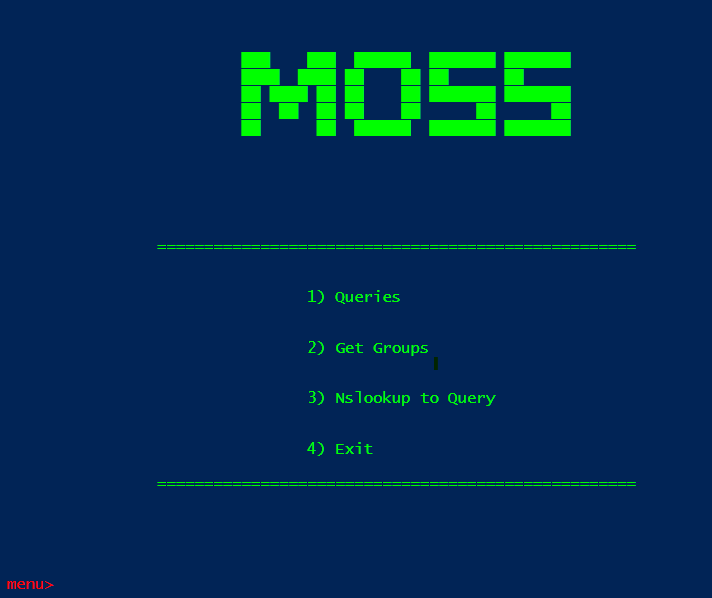
Nslookup
After it displays and copies the IP query into the clipboard, the code will go back to the main page of Moss.
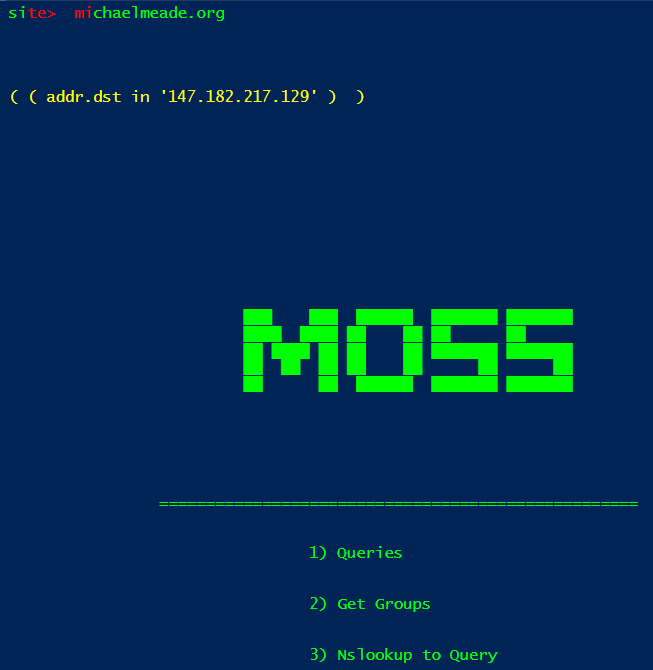
If there are multiple IPs found when performing the nslookup query, it will create a query with the IPs nested like the snippet shown below.
( ( addr.dst in '13.107.213.40' ) or ( addr.dst in '13.107.246.40' ) )
Getting User’s Groups
The get groups is the same code that I mentioned in my other article, Using PowerShell: At Work. The script is a little different than the one given in that article because, for an unknown reason, my permissions or something were changed that caused this part of the script to not work anymore.
But during the summer, I found a new way of getting the user groups. I am not going to show it in action for privacy reasons. I don’t want to accidentally expose something that I am not supposed to.
A new feature will turn a user name into an email address. It will detect if a space is included in the input string.
If there is a space, it will ask to replace the space with a . and ask for the user’s agency. Then it will append the name with the @ and the agency name and create an email, which will then get the AD Groups and print them out.
Turning Data Into Queries
After inputting a site, the following menu will show which currently has 15 different ways to create queries that can be used to query the firewall. During work, I usually mostly use the url contains ( 4 ) option since it will rarely match the exact URL given.
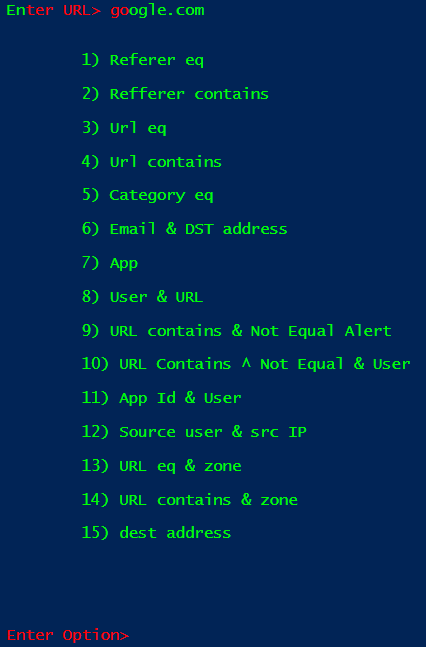
After picking an option, it will generate the query and copy it to the clipboard buffer, so all you have to do is paste it into the Firewall to search. It will also display the query it generates in yellow.
Below is an example of a query that was generated and copied to the clipboard.
( url contains 'Eduthings.com' )
The Log File
Before copying the generated query to the clipboard, the script will save the generated query in a log file.
This is so the user can have a record of the query that they can reuse at a later time.
The log file can be changed, but the output looks like this: query –> date & Time as seen in the image below.
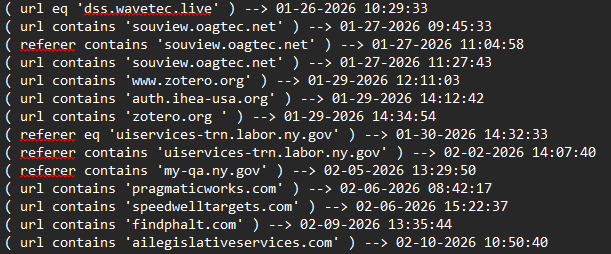
The Delimiter between the query and the date / time is -->.
The Code
$Host.UI.RawUI.ForegroundColor = 'green'

function Read-Host($prompt) {
    Write-Host "$prompt " -NoNewline -ForegroundColor Red
    Microsoft.PowerShell.Utility\Read-Host
}

function Log-Query {
param(
    [string] $q
)

    $filePath = "C:\Users\MMeade1\OneDrive - New York State Office of Information Technology Services\Desktop\fun\logs\logs.txt"
    $date = Get-Date -Format "MM-dd-yyyy HH:mm:ss"
    $write = $q + " --> " + $date
    Write-Output $write | Out-File $filePath -append

}


function Save-Query {
param(
    # Writes the query in console and also sets it in clipboard buffer
        [string] $query
    )
    Write-Host `n`n`n`n
    Write-Host $query -NoNewline -ForegroundColor yellow
    Set-Clipboard $query
    Log-Query $query


}

function Create-Email-By-Name {
param(
[string] $name
)
    # turns name to email
    $email_host = $name.replace(" ", ".")
    $agency = Read-Host "Enter Agency>"
    $email = $email_host + "@" + $agency + ".ny.gov"
return $email
}

function Get-Groups {
param(
    [string] $email
)
    # Gets a user AD groups
    $user_name = Get-aduser -Filter {UserPrincipalName -eq $email -and Enabled -eq $true } -Properties Enabled, UserPrincipalName, SamAccountName, mail | select SamAccountName
    $user = $user_name.SamAccountName;


    $user_groups = Get-ADUser -Identity $user -Properties MemberOf | Select -ExpandProperty MemberOf

    foreach ($group in $user_groups) {
        $name = $group.Split(',')[0].split("=")[1]
        Write-Host $name -ForegroundColor yellow
    }
    Write-Host `n`n`n
}

function Query-Menu {
    # Used to create query for palo

    Clear-Host

    $url = Read-Host "Enter URL>"


    Write-Host "`n`n`t`t1) Referer eq`n`t
    `t2) Refferer contains`n
    `t3) Url eq`n
    `t4) Url contains`n
    `t5) Category eq`n
    `t6) Email & DST address`n
    `t7) App`n
    `t8) User & URL`n
    `t9) URL contains & Not Equal Alert`n
    `t10) URL Contains ^ Not Equal & User`n
    `t11) App Id & User`n
    `t12) Source user & src IP`n
    `t13) URL eq & zone`n
    `t14) URL contains & zone`n
    `t15) dest address`n"

    Write-host `n`n`n
    $option = Read-Host "Enter Option>"
    Write-host `n`n
    if ($option -eq 1) {
        # Referer equals URL
        Save-Query "( referer eq '$url' )"
        Write-host `n`n
    }
    elseif ($option -eq 2) {
        # Referer contains URL
        Save-Query "( referer contains '$url' )"
        Write-host `n`n
    }
    elseif ($option -eq 3) {
        # URL is equal
        Save-Query "( url eq '$url' )"
        Write-host `n`n
    }
    elseif ($option -eq 4) {
        # URL contains
        Save-Query "( url contains '$url' )"
        Write-host `n`n
    }
    elseif ($option -eq 5) {
        # Category contains URL
        Save-Query "( category contains '$url' )"
        Write-host `n`n

    }
    elseif ($option -eq 6) {
        # url & dest addr
        Write-Host `n`n`n`
        $email = Read-Host "Enter username>"
        Save-Query "( addr.dst in '$url' ) and ( user.src eq '$email' )"
        Write-host `n`n

    }
    elseif ($option -eq 7) {
        # App equal URL
        Save-Query "( app eq '$url' )"
        Write-host `n`n

    }
    elseif ($option -eq 8) {
        # User and URL equal
        Write-Host `n`n`n`
        $email = Read-Host "Enter emails>"
        Save-Query "( user.src eq '$email' ) and ( url eq '$url' ) "
        Write-host `n`n

    }
    elseif ($option -eq 9){
        # URL contains & not equal alert
        Save-Query "( url contains '$url' ) and ( action neq 'alert' )"
        Write-host `n`n

    }
    elseif ($option -eq 10){
        # URL contains & not equal & user
        Write-Host `n`n`n`
        $email = Read-Host "Enter emails>"
        Save-Query "( url contains '$url' ) and ( action neq 'alert' ) and ( user.src eq '$user' )"
        Write-host `n`n

    }
    elseif ($option -eq 11) {
        # app id & user
        Write-Host `n`n`n`
        $email = Read-Host "Enter emails>"
        Save-Query "( app eq '$url' ) and ( user.src eq '$email' )"
        Write-host `n`n

    }
    elseif ($option -eq 12) {
        # Email & Source IP
        Write-Host `n`n`n`
        $email = Read-Host "Enter emails>"
        Save-Query " ( user.src eq '$email' ) and ( addr.src in '$url' )"
        Write-host `n`n
    }
    elseif ($option -eq 13) {
        # Search by zone & URL eq
        Write-Host `n`n`n`
        $zone = Read-Host "Enter zone>"
        Save-Query "( zone.src eq '$zone' ) and ( url eq '$url' )"
        Write-host `n`n
    }
    elseif ($option -eq 14) {
        # Search by zone & URL contains
        Write-Host `n`n`n`
        $zone = Read-Host "Enter zone>"
        Save-Query "( zone.src eq '$zone' ) and ( url contains '$url' )"
        Write-host `n`n
    }
    elseif ($option -eq 15) {
        #dest address
        Write-Host `n`n`n`
        Save-Query "( addr.dst in '$url' )"
        Write-host `n`n
    }
}


function Get-Ip-Query {
    param (
        $site
    )
    $ips   = [System.Net.Dns]::GetHostAddresses($site)
    $count = $ips.count
    $out = ""
    $i =0
    Foreach($item in $ips) {
        $i += 1
        If ($i -eq $count) {
            $out += "( addr.dst in '$item' ) "
        }
        else {
            $out += "( addr.dst in '$item' ) or "
        }
    }

    Write-Host "(" $out ")" -ForegroundColor yellow
    $clip = "(" + $out + ")"
    Set-Clipboard -Value $clip
    Write-Host `n`n`n`n
}


$bye = "

    ########  ##    ## ########
    ##     ##  ##  ##  ##
    ##     ##   ####   ##
    ########     ##    ######
    ##     ##    ##    ##
    ##     ##    ##    ##       ### ### ### ###
    ########     ##    ######## ### ### ### ###


"

$banner = "`t`t
           `t`t         ███    ███  ██████  ███████ ███████
           `t`t         ████  ████ ██    ██ ██      ██
           `t`t         ██ ████ ██ ██    ██ ███████ ███████
           `t`t         ██  ██  ██ ██    ██      ██      ██
           `t`t         ██      ██  ██████  ███████ ███████


"

while ($true) {
    Write-Host `n`n
    Write-Host $banner
    Write-Host `n`n
    Write-Host "`t`t`t`t===================================================`n"
    Write-Host "`t`t`t`n`t`t`t`t`t`t`t`t1) Queries`n`t
    `t`t`t`n`t`t`t`t`t`t`t`t2) Get Groups`n`t
    `t`t`t`n`t`t`t`t`t`t`t`t3) Nslookup to Query`n`t
    `t`t`t`n`t`t`t`t`t`t`t`t4) Exit`n`t"
    Write-Host "`t`t`t`t`===================================================`n"
    Write-Host `n`n`n
    $options = Read-Host "menu> "
    if ($options -eq 1) {
        Query-Menu
    }
    elseif ($options -eq 2) {
        # get groups
        Clear-Host
        $input_email = Read-Host "email> " -NoNewline -ForegroundColor red
        if ($input_email -match " ") {
            $input_email = Create-Email-By-Name $input_email
        }

        Write-Host `n`n`n`n

        Get-Groups $input_email
    }
    elseif ($options -eq 3) {
        Clear-Host

        $site = Read-Host "site> "
        Write-Host `n`n`n
        Get-Ip-Query $site
        Write-Host `n`n
    }
    elseif ($options -eq 4) {
        Clear-Host
        Write-Host $bye
        exit
    }
}
Notes
Some of the file paths have been changed to protect my privacy and opsec at my job.
Another new feature that I added that is that after generating the query it will save the newly created query into a txt file.
This acts as a log where I can see the date and time, and the query that was generated at a later time.
A new feature I added recently is that when it creates the query, it will save the newly created query in a text file.