
The Skinny on This CTF!
When I agree to be part of my team, I did not realize that you were supposed to be using AI. Usually during CTF, using AI is considered cheating and frown upon.
It took me a week to realize that we were supposed to use AI. I was using ChatGPT it was working okay. But I ran out of free credits.
I use the AI they gave us, but it was decent but I could not get it to solve a few challenges. This tutorial is before I realized you were supposed to use AI.
One interesting that happened was I gave it the Zip file of the challenges and told it to solve it. It could not solve four challenges.
I then gave it the password infected and it was able to solve the four challenges.
Back to the ChatGPT, I asked my team and they gave me z.ai. This worked great, I did not run into any limitations or anything.
I do want to note that it is ran by a Chinese company so I would be careful the type of information that you give it.
I really did not help on the AI side besides being back up for the web challenges incase the AI could not solved it. It was a race between AI and us.
Some of the earlier web challenges we had to solve manually because we did not have any agents set up to solve them because we did not know how they would work. I enjoyed solving them manually,
But I did give my global Token to my team mates who used it for the AI. But I did learn some things about AI and get experience using AI in ways I have not done before.
Day One
🔎 You Must Be This Hash to Ride
With hashes, if one byte is changed then the hash will be different. Hashes are often used for integrity.
Some sites that host file such as executables will show a hash of a file and then sign the hashes with their private key as a way to prove that the hash of the file is the one created by them. You use the creators public key to verify the signature.
Only the person who is in control of the private key will create a valid signature. You should always compare hashes before running a file
evidence-note-size-bytes
The script below will read the file contents in memory and use the .bytes.size to get the size of the file in bytes.
r = File.read("evidence-note.txt")
puts "Bytes:\s: " + r.bytes.size.to_s
The bytesize was 240.
evidence-note-filename
This one was too easy. The flag was just the filename.
evidence-note.txt
evidence-note-md5
I used the following command to get the md5 sum of the file. MD5 is a one way hashing algorithm that generates a hexadecimal string representing a 128-bit hash.
If one byte of the file changed the whole hash will be different. It is used for Integrity of files.
Only problem is that MD5 are vulnerable to collisions meaning that they can generate the same hash for TWO different files that has different contents. MD5 should not be used.
md5sum evdence-note.txt
The MD5 hash was: 6b5074cd2b741ee5d0f0f9cae5eba7d5.
evidence-note-sha1
I used the following command to get the SHA1 hash of the file. Sha1 will take the contents of a file and output a hash. The hash of the file will always be same size bit. The NSA created SHA1.
The hash is a one way function meaning you can’t reverse the hash. If one byte is changed, the hash will be completely different.
It should be noted SHA1 is considered broken and should not be used for important situations.
There is something called collision attacks where two different files could have the same hash. This means that SHA1 is cryptographically broken.
sha1sum evdence-note.txt
The SHA1 hash is: 11f594f647b3c81bce2527c0d9f6c72a60f492d9
evidence-note-sha256
I used the following command to get the SHA256 hash of the file. SHA256 is very similar to SHA1 but is not considered insecure.
It is also a one way hash and has a fixed length. Fun fact is that Bitcoin uses SHA256 as a hash function.
sha256sum evdence-note.txt
The SHA256 hash is: a6d2d239a6ba996a16ea585c9dd5874b9a0fcdb1e16e3f10457d5ea79e944dc6.
👶 A Little Based
This is day one challenge. Base64 is not encryption but is encodes text. It can be used to transmit text in it’s original form across the internet.
But it should not be used to encode sensitive information because it can easily be decoded.
The follow base64 text is the challenge.
TmljZSB3b3JrIGRlY29kaW5nIHRoaXMgd2FybXVwISBUbyBzb2x2ZSwgc3VibWl0IHRoaXMgZXhhY3QgYW5zd2VyIHRvIHRoZSBHYW1lIE1hc3RlcjogZmFuY3ktcGlhbm8tbnVnZ2V0LTQ5
The following command can be used to decode the base64 text:
echo "TmljZSB3b3JrIGRlY29kaW5nIHRoaXMgd2FybXVwISBUbyBzb2x2ZSwgc3VibWl0IHRoaXMgZXhhY3QgYW5zd2VyIHRvIHRoZSBHYW1lIE1hc3RlcjogZmFuY3ktcGlhbm8tbnVnZ2V0LTQ5" | base64 -d
Which is decodes to the following text:
Nice work decoding this warmup! To solve, submit this exact answer to the Game Master: fancy-piano-nugget-49
Day Two
📱 Deep Link Drift
I downloaded the apk and used apktool to decompile the apk. An Apk is kind of just like a zip file.
It can be extracted and some of the source code can be read. Apktool can even recompile the apk files.
In the asset folder there is a json file with the named huntress_puzzle.json.
{"schema":"huntress.mobile.puzzle.v1","day":2,"codec":"reverse","data":"94AEE0A765B0097A-SNA"}
The codec string says it is reverse. The data value is what I need to reverse to get the flag. I used the following command:
echo "94AEE0A765B0097A-SNA" | rev
Which gave me: ANS-A7900B567A0EEA49. I submitted the flag to the AI and it gave me: 0397b5fd987d5e207a17b8b0f6040051
🔎 Looks Can Be Deceiving
The description of the challenge is: What are the first sixteen bytes as lowercase hexadecimal?
I wrote a quick Ruby script to get the first 16 bytes.
r = File.read("evidence-note.txt")

hex = r.byteslice(0, 16).unpack1("H*")

puts "HEX:\s: #{hex}"
👶 Half a Turn
The text file had the following contents.
Avpr jbex qrpbqvat guvf jnezhc! Gb fbyir, fhozvg guvf rknpg nafjre gb gur Tnzr Znfgre: cyhpxl-pybpx-syvag-94
It looks like ROT13. Which means each letter is shifted 13 letters. So A would be N.
The flag was plucky-clock-flint-94.
Day Three
👶 Hex Appeal
The hex is:
4e69636520776f726b206465636f64696e672074686973207761726d75702120546f20736f6c76652c207375626d6974207468697320657861637420616e7377657220746f207468652047616d65204d61737465723a206e696d626c652d73636f6f7465722d626f756c6465722d3838
This Ruby script is how I converted the hex into text.
r = File.read("hex_appeal.txt")

text = [r].pack("H*")

puts "TEXT:\s#{text}"
The de-hexed message is the following: Nice work decoding this warmup! To solve, submit this exact answer to the Game Master: nimble-scooter-boulder-88
📱 Intent Injection
I first downloaded the .apk and used apktool to decompile the apk. A string can be identified as Base64 if it ends with a = or ==.
But it does not have to have them to be considered base64. I used the following command:
apktool d intent_injection.apk
In the assets folder there was the following JSON blob.
{"schema":"huntress.mobile.puzzle.v1","day":3,"codec":"base64","data":"QU5TLUU0QzhFMzVBOEE5QjVENjc="}
Notice how the data key looks like it has base64 text in it. I used the following command to decode the base64.
echo "QU5TLUU0QzhFMzVBOEE5QjVENjc=" | base64 -d
Which when decoded was: ANS-E4C8E35A8A9B5D67. I submitted and it was correct.
Day Four
🔎 Picture This
In this challenge they gave us a image. The question was: Determine jpeg.sof_dimensions_pixels for camera-001.jpg.
I downloaded the image, and unzipped the zip file. Which contained a single image called camer-001.jpg, I looked at the details of the image.
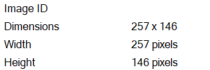
The answer to the question was 257,146 which is the width and height combined.
👶 Two of a Kind
01001110 01101001 01100011 01100101 00100000 01110111 01101111 01110010 01101011 00100000 01100100 01100101 01100011 01101111 01100100 01101001 01101110 01100111 00100000 01110100 01101000 01101001 01110011 00100000 01110111 01100001 01110010 01101101 01110101 01110000 00100001 00100000 01010100 01101111 00100000 01110011 01101111 01101100 01110110 01100101 00101100 00100000 01110011 01110101 01100010 01101101 01101001 01110100 00100000 01110100 01101000 01101001 01110011 00100000 01100101 01111000 01100001 01100011 01110100 00100000 01100001 01101110 01110011 01110111 01100101 01110010 00100000 01110100 01101111 00100000 01110100 01101000 01100101 00100000 01000111 01100001 01101101 01100101 00100000 01001101 01100001 01110011 01110100 01100101 01110010 00111010 00100000 01110111 01101001 01110100 01110100 01111001 00101101 01110011 01110100 01100001 01110010 01100110 01101001 01110011 01101000 00101101 01110100 01110101 01110010 01110100 01101100 01100101 00101101 00111001 00110110
It gave us a Binary output. With Binary it uses a base-2 number system that uses only 0 and 1. A message can be recovered as seen in this challenge.
The binary decoded to the following message:
Nice work decoding this warmup! To solve, submit this exact answer to the Game Master: witty-starfish-turtle-96
📱 Pending Intent Relay
I downloaded the apk and used the following command to decompile it. XOR is symmetric encryption that scrabbles and unscramble data using a key.
If the key is too short or repeated, frequency analysis and key-length can be used to break the message. Unlike SHA256 and SHA1 the original text can be recovered.
apktool d pending_intent_relay
Inside the apk there was a JSON file named huntress_puzzle.json. The contents of the file looked like:
{"schema":"huntress.mobile.puzzle.v1","day":4,"codec":"xor","data":"XFNOMCstXCxeXCVYJSQkKiUpKy8=","key":29}
Looks like it is XOR. And the key is 29. The hex representation is: 5c 53 4e 30 2b 2d 5c 2c 5e 25 58 25 24 24 2a 25 29 2f. The asci is: ANS-60A1C8E8.
Day Five
👶 By the Numbers
The code they gave is:
78 105 99 101 32 119 111 114 107 32 100 101 99 111 100 105 110 103 32 116 104 105 115 32 119 97 114 109 117 112 33 32 84 111 32 115 111 108 118 101 44 32 115 117 98 109 105 116 32 116 104 105 115 32 101 120 97 99 116 32 97 110 115 119 101 114 32 116 111 32 116 104 101 32 71 97 109 101 32 77 97 115 116 101 114 58 32 115 116 117 114 100 121 45 114 105 118 101 114 45 103 114 111 118 101 45 53 55
The snippet above are decimal ASCII format. Each number represents a letter. I wrote a quick Ruby script that will decode the message. The code to this script is below.
code = "78 105 99 101 32 119 111 114 107 32 100 101 99 111 100 105 110 103 32 116 104 105 115 32 119 97 114 109 117 112 33 32 84 111 32 115 111 108 118 101 44 32 115 117 98 109 105 116 32 116 104 105 115 32 101 120 97 99 116 32 97 110 115 119 101 114 32 116 111 32 116 104 101 32 71 97 109 101 32 77 97 115 116 101 114 58 32 115 116 117 114 100 121 45 114 105 118 101 114 45 103 114 111 118 101 45 53 55"

puts  code.split(" ").map {|letter| letter.to_i.chr }.join
The code output was: Nice work decoding this warmup! To solve, submit this exact answer to the Game Master: sturdy-river-grove-57
📱 Backup Spill
Once again I used apktool to decompile the apk. Inside the decompiled in the assets folder there was a JSON file named: huntress_puzzle.json, The contents of the JSON file is below.
{"schema":"huntress.mobile.puzzle.v1","day":5,"codec":"split","data":"","parts":["0A353BE7B","ANS-5","709E18"],"order":[2,0,1]}
Looks like the parts flag is a three element array. Arrays are a little bit weird. For a lot of programming languages the index starts at 0 instead of 1.
So:
-
0A353BE7Bwould be0index - ANS-5 would be
1index 709E18would be2index
The order key tells us the order the parts should be in for it to be a valid flag. The order is: ANS-5709E180A353BE7B
Day 7
👶 Percent Chance
We were given the following text:
%4e%69%63%65%20%77%6f%72%6b%20%64%65%63%6f%64%69%6e%67%20%74%68%69%73%20%77%61%72%6d%75%70%21%20%54%6f%20%73%6f%6c%76%65%2c%20%73%75%62%6d%69%74%20%74%68%69%73%20%65%78%61%63%74%20%61%6e%73%77%65%72%20%74%6f%20%74%68%65%20%47%61%6d%65%20%4d%61%73%74%65%72%3a%20%77%69%74%74%79%2d%73%74%6f%72%6d%2d%66%65%72%6e%2d%37%37
Which I instantly recognize to be URL encoded data. This is often used to convert characters into a safe format that keeps intact when sent over the wire.
Used this quick Ruby script to decode it:
require 'uri'

data = "%4e%69%63%65%20%77%6f%72%6b%20%64%65%63%6f%64%69%6e%67%20%74%68%69%73%20%77%61%72%6d%75%70%21%20%54%6f%20%73%6f%6c%76%65%2c%20%73%75%62%6d%69%74%20%74%68%69%73%20%65%78%61%63%74%20%61%6e%73%77%65%72%20%74%6f%20%74%68%65%20%47%61%6d%65%20%4d%61%73%74%65%72%3a%20%77%69%74%74%79%2d%73%74%6f%72%6d%2d%66%65%72%6e%2d%37%37"
decoded = URI.decode_www_form_component(data)
puts "Decoded:\s #{decoded}"
The script decoded the data into: Nice work decoding this warmup! To solve, submit this exact answer to the Game Master: witty-storm-fern-77