
Table of Contents
Transfering money to a friend or someone has never been this easy. But when it becomes easy it also means that you will need have extra methods in place to protect your data any your hard earned money.
The first thing you should do after reading this article is to add 2 factor authentication to your banking apps. Yes, I understand it is annoying but it is better than having your hard earned money being stolen.
2 factor authentication means that after enter your email and password successfully it will require you to enter a 6 digit number that is usually emailed or sent via text.
But it could also be obtain through Authentication apps. The code is needed to login to the account.
This gives you extra protection because a password or email can be stolen but it is hard to get that digit code. There are methods threat actors can use to obtain it.
One method that targets the user phone is called Sim swapping. They will call up your mobile provider pretending to be you.
They will ask the provider rep to change the sim code on your phone. If successful that means all phone calls, text messages and the data will go through the threat actors phone instead of your phone.
Most mobile providers have extra protection you can set up or buy that will make it harder to for a threat actor to sim swap.
Technically speaking using an authentication app is better than receiving the code via Email and phone numbers.
Both of these can be hacked. An authentication app like Google Auth, RSA, authenticator are way more secure.
But if someone one asks for the 6 digit code, you should refuse to give it to them. Even if they say they are IT support. The code is not meant to be shared.
Be Picky What You Download
You should only download and run programs that you trust and you can be sure is from the real site. Check the hashes of the program to make sure that it is the valid program. Check out How to Safely Download Files to learn how to check the hashes.
This means being picky on your phone as well. Just because an app is on the Play Store or Apple store does not mean it is not malicious. You should ALWAYS check the reviews for any unwanted malicious comments.
Don’t download apps from random sites that have a third party app store. Hackers could clone an real app and insert malware and upload it to the third party app store. An APK is almost just a zip file, meaning they can get almost the complete app source code. It depends how the app was designed.
Rooting or jailbreaking a phone is cool and you can do a lot of cool things. I even at one time was into rooting phones. But rooting or jailbreaking a phone makes its more vulnerable. “Android phones are 3.5 more times to be targeted with malware“.
This might because apps that do a certain task for rooted devices are usually not on the official play store. These apps might work, but they could also be infected with malware. Also some banking apps will now allow you to use their app because you rooted or jailbroke your phone for security reasons.
Do Not To Save Credit Card Data
This tip is hard, I sometimes forget this tip sometimes. Be careful saving your credit or debit information in browser.
If you computer is ever infected with malware, they can dump the browser data and obtain the information of your credit or debit card and even your stored passwords. I know it very convenience to have the data stored but it can also be easily stolen by malware. This is especially true if you are using a public computer like at a library or cafe.
Also because a hacker could dump your browser data including your passwords is just one more reason to use 2 factor authentication. This means your password and email is useless unless they have access to the second factor. The best second factor authentication is a Yubi key or Google Auth apps code.
Emails are good but can be compromised. Using an app like Google Auth or a hardware key is the most secure. Note that there could also be vulnerabilities in the way a site or app handles 2 factor authentication that a hacker could abuse to get access to an account.
Writing Down Passwords
Physically writing down your passwords in a notebook will protect you from online hackers but if a robber finds it they could steal it and access your accounts. While this is unlikely it could happen. Here are some ways to mitigate it being stolen.
- Don’t write on tops of the notebook that it is being used for passwords
- Only put the information you need in the notebook
- Hide it in a book shelf, amongst other books
- Don’t tell family or friends about it
- Keep or store extra copies in a safe
- Don’t put passwords on sticky notes and attach them under the desk or on the computer
Use a completely unique password for your banking apps. Use a password manager to create a long 10 – 16 characters password.
With password managers you only need to remember one password so you can access your other passwords.
This is very handy but the password for the password manager must be really secure. Also it you really have to make sure you don’t visit any sketchy sites or download unknown software because even if you used a password manager the malware author can grab the password to your password manager and then all your accounts should be considered compromised.
Don’t Bank On Public WIFI
Using public WIFI can be dangerous. You do not know if someone is intercepting the traffic.
It is highly suggested to not do any banking on public WIFI like at a hotel. One way of ensuring that anyone on the network can’t intercept the traffic is to use a VPN.
This encrypts the data so that a threat actor can not intercept the traffic. The only thing is that the VPN provider could log the traffic and you would never know.
You should find a trusted VPN provider or if you are technically capable set up a VPN tunnel on your home network where you can route your traffic through your home network.
Recently there have been reports of threat actors modifying Hotel routers to redirect users to phishing sites. Always verified that you are on the correct domain BEFORE entering your data.
Staying Secure On Venmo
This does not just apply to Venmo but it should be used with similar apps too. Not just Venmo. You should really do it to all of your financial apps.
Venmo makes it easy to send or receive money from friends or family. It is kind of like a social media site.
You can write a description why you are sending the money to your friend. But this is where it can be risky. This information can and will be abused by malicious people.
You should always make the request private and not public. Why would you want everyone to know why you sent money to a person?
But also it can be used against you. If someone one sees that every Christmas your Grandma sends you money. A hacker could make an account that is very similar to your Grandma’s user name.
This account might send a request to you for money. You are busy shopping, you might click accept and send the money without even thinking.
Not to get political, but in 2021 Joe Biden was the President of the United States. Well, he also is a grandpa. It turns out that Biden’s Venmo history was public. Meaning all this transactions to his grand kids were public.
This information could be abused even if you are not the leader of the free world. Hackers could use this information not only to target you but target your loved ones.
They now know you are connected to a person, they can could build a social map of people you are connected to. I highly suggest to take the extra time to ensure that the request or transfer is set to private instead of public.
This should be applied to all the other services like Venmo.
Using One Email For Financial Accounts

You should use one single email for all of your financial accounts. Ideally this email would not have any identifying information tied to you.
This part is important, make sure to enable 2 factor authentication. Create an unique password that is at least ten characters and include a special character.
Do not re-use this password anywhere else. Because this password is unique, I would suggest to write it down physically on paper and put it in a safe.
Or even use a password manager, most password managers have features within them that they can generate secure passwords.
I would use that feature if you are using a password manager. It is important to not use email for anything other than financial sites. If possible and within your budget, I would suggest getting one of the following.
These are little usb like devices that after entering your password information you insert this into your computer and it login you in if the device is valid.
This means even if you get phished, they will not be able to login into your account without the physical device.
It is suggested to get at least two of one of these so incase you lose or one get stolen you can still access your account. Because without the device you will not be able to login. Keep the extra key in a safe or some where safe.
Staying Safe With Crypto
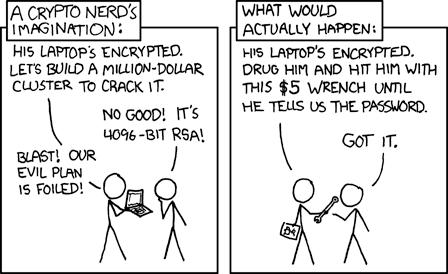
You should remember that loose lips sink ships when dealing with cryptocurrency. Be careful of posting online that you have crypto, there is a physical attack known as $5 wrench attack.
This is when a attacker targets you and forces you to physically give them access to your crypto. They will use physical force to get you to transfer the crypto or give them your seed.
You can prevent this type of attack by not mentioning on social media that you own crypto. Never post your wallet address or images of your balance. People who aim to steal crypto from people lurk on Social media and you will become a target of online attacks and even maybe physical attacks.
If you need to post about your crypto holding, I suggest creating an account on social media with a username that does not contain your real name.
Make sure you post nothing that might reveal your real life identity. Re-frame from posting images of your wallet or pictures in front of a nice car that includes the license plates on the front of the vehicle.
Create a new email and sign up with this email to ONLY the social media site. Similar to the new account, this email should not have your real name or anything personal in the name or account. It is important to only use this account with sites that you want to keep anonymous.
This is so if one of the social media sites is breached, your information will lead anywhere. Hackers will often use data breaches to find and target people. By using a site that contains zero information about your real life identity you are protecting yourself from attacks.
Set up 2 factor Authentication
Like your banking app any sites you have that is related to cryptocurrencies should have 2 factor authentication enabled on it. While it won’t protect your 100% but it will protect your 99% of the time.
Depending on how it is setup, there could be vulnerabilities that could be exploited to bypass 2 factor authentication.
While this is rare, it could happen. Instead of using a phone number use a physical key that was mentioned earlier like the Yubikey or another email address that also has 2 factor authentication enabled.
Email as a 2 factor authentication is also insecure because if the email gets hacked, all the other accounts used by the email will likely also be targeted.
Storing Crypto Seeds
Do not store seeds in a text file that is clearly labeled crypto. If you want to store it in a text file, maybe encrypt the file with GPG. Another option is to use a Password Manager. These make it easy to store login of all the accounts you own. You will just need to remember one very secure password.
Also do not store images or files of your seed in your email or file hosting services such as Onedrive or Google Drive.
Avoid Share Screening
Avoid share screening your wallet or anything else related to cryptocurrency with strangers on the internet. If you show your seed, people can quickly steal your coins.
This would go with the rule that you should not publicly brag or talk about how much coins you have. You cannot change a seed once exposed, you would have to create a new one and send the crypto to a new address before they do the same your crypto.